This blog was originally started to better help me understand the technologies in the CCIE R&S blueprint; after completing the R&S track I have decided to transition the blog into a technology blog.
CCIE #29033
This blog will continue to include questions, troubleshooting scenarios, and references to existing and new technologies but will grow to include a variety of different platforms and technologies. Currently I have created over 185 questions/answers in regards to the CCIE R&S track!! Note: answers are in the comment field or within "Read More" section.
You can also follow me on twitter @FE80CC1E
Master Selection - High Availability with Fortinet
Master (also known as the Primary) is chosen based on the following
- monitored port - (highest number of connected non failed monitored interfaces)
- system up time (age) - (longest up-time)
- unit priority - (default 128 - higher priority is selected as Master)
- serial number - (highest serial number)
As soon as the FGCP protocol hits the first criteria that meets the requirement of the master selection process the rest of the evaluation process is no longer evaluated and the master node is selected.
I know its been awhile and I am looking forward to posting again. I most recently have been asked to look deeper into Brocade so I looked up their certification path and was surprised to find the following
Data Center Enhanced Ethernet (NGDC - Next Generation Data Centers)
- Priority Based Flow Control (802.1Qbb) - Supports storage traffic and provides CoS flow control
- CoS Based BW Management (802.1Qaz) - CoS based enhanced transmission, grouping of classes into "service lanes"
- Backward Congestion Notification (BCN/QCN - 802.1Qau)- end to end congestion management for L2 network
- Data Center Bridging Capacity Exchange Protocol (DCBXP - 802.1AB) - Auto-negotiation for enhanced Ethernet capabilities (switch to nic)
I have heard some engineers and administrators claim that their systems are available 100% of the time. I wanted to ensure that there is a clear understanding on what 100% availability means. Up-time does not equal availability; you can have a system that is up but the services may not be available. You also need to consider maintenance windows as this impacts your overall availability. If you do not have the ability to do maintenance without impacting the services that you are providing then your overall availability percentages take a hit. Other things that may impact your ability of achieving 100% availability includes environmental's such as power, cooling, etc and other services that are required to provide access to the very services that you are providing such as internet connectivity, WAN, LAN, SAN, etc....
Below is a chart showing the availability percentages and the expected downtime per year based on these percentages.
So.....are you really providing 100% availability?
This post is a follow up to a previous post
"Virtualization-Vmware-Clusters and Blade Servers" where we discussed limitations with HA in previous versions of VMware.
In vSphere 5.0 the concept of 5 primary/secondary hosts has been eliminated and the concept of master/slave exists. A single host is the master and all other hosts are slaves, if the master fails then an election process is kicked off and a new master is elected.
This eliminates issues in previous versions of VMware where the primary/secondary concept existed and we needed to consider
- Number of hosts in a cluster
- Managing the role of the host
- Number of consecutive host failures
- Placement of hosts across blade chassis and stretched clusters
- Partition scenarios likely to occur in stretched cluster environment
By the way Dave thanks for the link
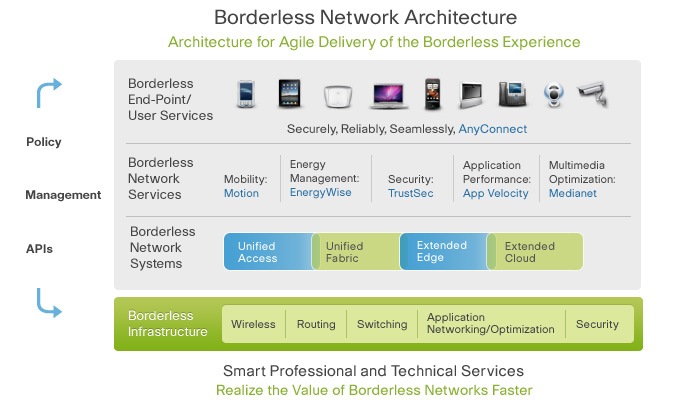
Cisco's borderless networks provides secure, seamless, and reliable connectivity to anyone, anywhere, anytime to anything. Borderless network architecture is a technical architecture that allows organizations to realize these benefits.
Blade chassis help further consolidate the data-center footprint and provide an excellent platform to run virtualization; this further consolidates the data-center footprint. I have noticed on a variety of installations the failure to ensure proper placement of the primary nodes when installing a VMware cluster on blade chassis technology. Primary placement is critical to ensure the availability of VMs in the event of a blade chassis failure. There are 5 primary nodes per cluster and these are selected as the nodes are added to the cluster. Primary nodes holds all cluster settings and node states and this is replicated to all primaries. Secondary nodes do not become primary nodes if a primary node were to fail. Heartbeats are sent from primary to primary nodes and from secondary to primary nodes. If a primary node fails and is not removed then no secondaries become primaries, but if a failed primary node is removed from the cluster than a secondary node becomes a primary node - the selection of which secondary node becomes a primary node is random further complicating the balancing of primary nodes. The diagram below shows 3 blade chassis's running in RACK A leveraging VMware, the diagram below shows the problems that happen when improper placement of the primary nodes is not followed. In the case below the blade chassis's are HP C7000 series. The installation of ESX is completed in the order of the blade server slots assigned by the blade chassis and all 5 primary nodes end up on one blade chassis (the installation includes adding the nodes to the cluster). The issues identified in the diagram.
Leveraging Virtualization to provide zero impact maintenance during production hours.
Before performing maintenance on the physical node in question you need to migrate the VM over to another physical node. This step is non-disruptive to the production environment and the VM continues to provide services.
The migration happens fairly quickly with zero impact. You have to ability to migrate VM's either hot or cold but typically your VM's are running in production environment and cannot tolerate down time; therefore most administrators migrate them hot.
FCoE (Fibre Channel over Ethernet) allows companies to further converge their infrastructure reducing the complexity and costs.
- Reduction in Cables and Switches
- Reduction in Interface Cards
- Reduction in Power and Cooling
FCoE runs on your data network and removes the need to have a separate Fibre channel infrastructure. FcoE is not routable and will not extend across routed IP networks. FCoE runs on top of Ethernet and enhancements to Ethernet were required in order to prevent frame loss (PFC). The new enhancements to Ethernet are referred to as Lossless Ethernet.
- Priority Flow Control (802.1Qbb)
Additional enhancements to Ethernet may include (dependent on the vendor)
- Bandwidth Management (802.1Qaz)
- Congestion Management (802.1Qau)
- Shortest Path Bridging (802.1aq)
Servers leverage CNA (Converged Network Adapter) with contains both the NIC (Network Interface Card) and HBA (Host Bus Adapter). CNAs have 1 or more ports.
Note: The diagram below is NOT meant to show redundancy.