This blog was originally started to better help me understand the technologies in the CCIE R&S blueprint; after completing the R&S track I have decided to transition the blog into a technology blog.

CCIE #29033

This blog will continue to include questions, troubleshooting scenarios, and references to existing and new technologies but will grow to include a variety of different platforms and technologies. Currently I have created over 185 questions/answers in regards to the CCIE R&S track!! Note: answers are in the comment field or within "Read More" section.

You can also follow me on twitter @FE80CC1E


Sunday, July 24, 2011

NX-OS GOLD

GOLD - Generic Online Diagnostics empowers support staff to become proactive instead of reactive. GOLD helps identify hardware failures before they happen. This is not new to Cisco products but powerful feature to have included in the Nexus platform. GOLD tests and verifies the functionality of components at various times which enables support staff to become proactive. Tests that are performed can be executed with no system impact running in the background and other tests need to be run in a controlled environment as they may be disruptive to production.
GOLD suite of diagnostics include
-Bootup Diagnostics
-Runtime Diagnostics
-On-Demand Diagnostics

Saturday, July 23, 2011

NX-OS Port Profiles

Port-Profiles can be used to streamline the configuration of ports that have a common configuration. You must create a port-profile with common settings and apply it to an interface.

Create a port-profile
(config)#port-profile PORTS
(config-ppm)#switchport
(config-ppm)#switchport mode access
(config-ppm)#spanning-tree port type edge
(config-ppm)#spanning-tree bpdufilter enable
(config-ppm)#no shutdown
(config-ppm)#state enabled

Apply to an interface
(config)#interface ethernet 1/1
(config-if)#inherit port-profile PORTS

Friday, July 22, 2011

NX-OS 802.1D-2004 (Dispute Mechanism)

Dispute Mechanism can prevent loops in the following scenarios 
-unidirectional links
-port-channel misconfiguration

This feature is enabled by default on the Nexus platform and cannot be disabled.

Thursday, July 21, 2011

NNI

Recently I was asked to explain what an NNI was and I thought that this would make for a great topic for my blog

NNI - Network Network Interface. I will be explaining NNI in a GMPLS (Global MPLS) scenario.

The EMEA MPLS Provider is offering services but the Asia locations have to pay for expensive connectivity options over long distances. This increases latency and costs even when the Asia customers want to communicate with other Asia customers such as Hong Kong and Singapore.

The EMEA MPLS Provider partners with a Third Party MPLS Provider which provides a local MPLS network and has local presence in each center reducing the overall costs. This provides low latency connectivity options within the region. The EMEA MPLS Provider and the Third Party MPLS Provider create an NNI connection with each other and form a GMPLS network.
 

NX-OS User Modes

EXEC Mode - When you log in you are placed into the EXEC Mode. Commands include:
-show
-clear
-Other commands that perform actions that do not save into the device configuration

Global Configuration Mode - global commands that affect the device as a whole
to enter this mode enter "configure terminal". This also enables you to enter more specific configuration modes.

Interface Configuration  Command Mode (sub-mode example this is not the only sub-mode available)
(config)#interface ethernet 1/1
(config-if)#

Note: You do not need to specify speeds like you do in IOS such as "interface fastethernet 1/1" or "interface gigabitethernet 1/1", you just specify ethernet as the speed is determined by NX-OS and displayed in the respective "show" commands.

Wednesday, July 20, 2011

NX-OS Licensing

You must install a license from Cisco, you must copy the license file to flash.

To show the license file installed do the following
"show license host-id"

To install a license file
"install license bootflash:license_file.lic"

To install a 120 day grace period license for testing - Caution should be taken as the configuration is wiped automatically at the end of the grace period.
"license grace-period"

Thursday, July 14, 2011

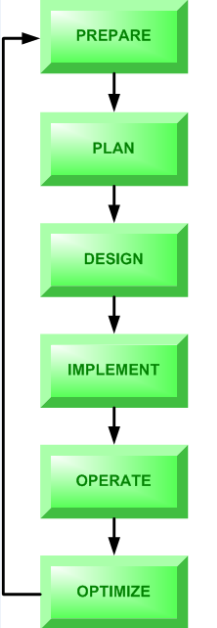
PPDIOO

Cisco PPDIOO Methodology
If you were to break up the process by job function what would be the result?


Job Functions
Architecture
Design Engineering
Deployment Engineering
Operations

Sunday, July 10, 2011

Best Practices Part 1 - Layer 2 Spanning-Tree

The topology depicted in the diagrams is used to help demonstrate data flow during failure and to provide discussion around best practices and may not be necessarily be configured as optimal as possible. I will provide examples in a series of blogs that will provide alternate technical solutions that follow best practice guidelines.

Topology Image
Normal Data Path Flow
 Data Path Flow Root Fail

Data Path Flow-Access Trunk Fail
Data Path Flow Router Fail

Spanning-Tree mode Rapid-PVST (802.1w) or MST (802.1s) - I will show more about load balancing techniques leveraging each of these technologies in "Layer 2 Spanning-Tree Best Practices Part-2" Deterministic blocked ports - in this example we know exactly which ports are going to be blocked by STP. All redundant connections to the secondary root bridge will be blocked. Cisco also recommends that you do not exceed STP diameter of seven hops. Ensure that you hard configure your Root and Secondary Root bridges. Ensure that you only allow required VLAN's over the trunks to ensure you are not running unnecessary STP instances.

Features to leverage include:
Access Layer
-portfast
-bdpuguard
-disable DTP
-loopguard
-etherchannel Guard

Distribution Layer
-root and secondary root placement
-root guard
-disable DTP
-etherchannel Guard

Leverage EtherChannel to reduce the number of ports that need to transition from blocking to forwarding state when leveraging multiple links.

EtherChannel Ports
-EtherChannel Guard

Saturday, July 2, 2011

TURN

TURN - Traversal Using Relay NAT - allows a device that is behind a firewall or NAT (Symmetric NAT or better known as Bi Directional NAT) device to receive incoming data leveraging TCP or UDP. TURN will most likely provide connectivity to the client but it does come at a high price to the provider. STUN is generally used first and TURN is used as a last resort.

The host sitting behind the NAT device is called a TURN client which connects the the TURN server on the public internet which acts as a relay. The TURN client communicates and arranges with the TURN server to have the server relay the packets to the desired peer. When the TURN client and peer want to communicate, the communication from the TURN client to the TURN Server is encapsulated within a TURN MESSAGE. The communication between the peer and the TURN server is not encapsulated.

TURN - RFC 5766

Friday, July 1, 2011

STUN

STUN - Session Traversal Utilities for NAT (RFC 5389) - used in NAT Traversal for applications real-time video, voice, messaging and other IP communications that are interactive.

STUN works with the following types of NAT
- Full cone NAT
- Restricted cone NAT
- Part Restricted cone NAT

STUN does not work with bi-directional NAT (Symmetric NAT). TURN works better with this type of NAT

STUN works as follows
- Client (OS or application) on a private network sends a "binding request" to the STUN server on the public internet.
- STUN Server sends "success response" that contains an IP address and PORT as observed from the the STUN servers. (After the Client has been natted)

Once the client is aware of its external IP address and port number it uses this external IP address and port number when communicating to its peers. This allows its peers to establish communications to the device which would otherwise not be accomplished since the client is on a private IP network.

Standard Ports for STUN
UDP/TCP 3478
TLS 5349